Mark Kashef thumbnail

📝 Mark Kashef Blog

Build an Entire Army of AI Agents from One Prompt: A Step-by-Step Guide with Claude 4 Opus and n8n

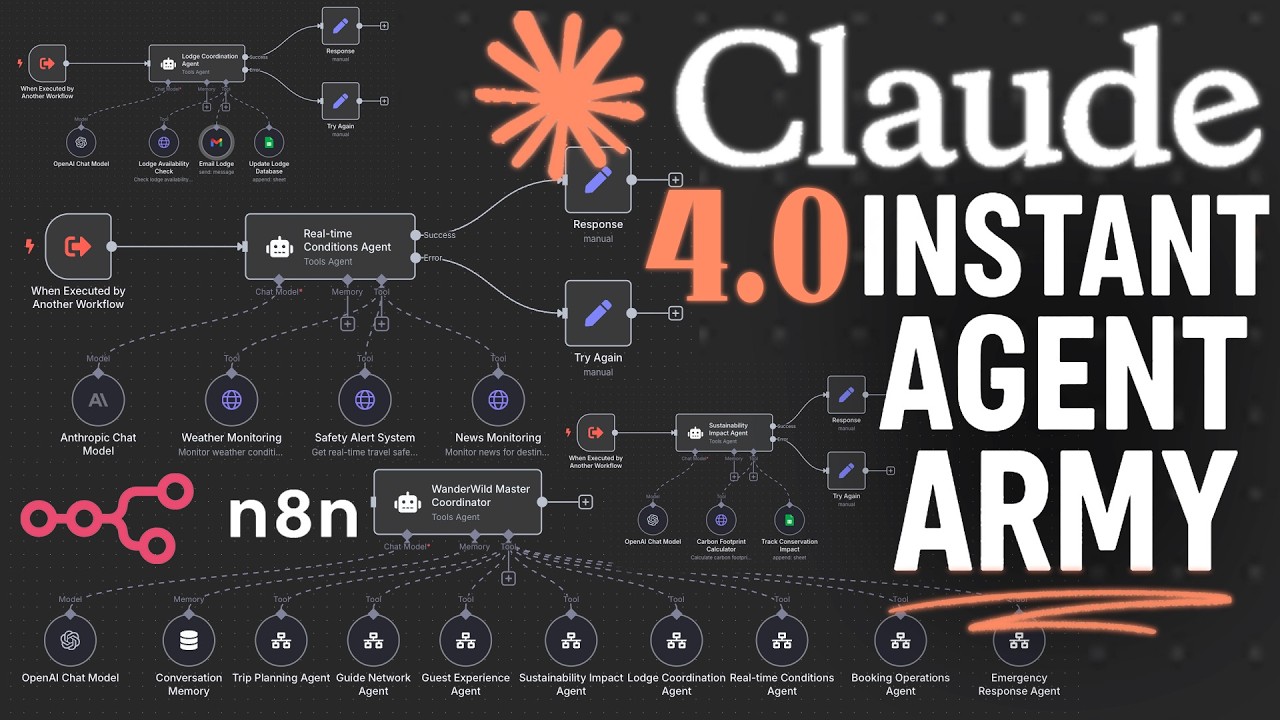
Imagine if you could create a whole army of AI agents—each specialized for different tasks—all generated instantly from a single prompt. No coding, no manual setup, just a powerful, automated workflow tailored to your business needs. Thanks to the new capabilities of Claude 4 Opus, combined with n8n’s AI agent modules and powerful workflow automation, this is now a reality. In this blog post, we’ll explore how to build sophisticated AI agent systems in minutes, even if you’re new to automation.


What You’ll Learn

  • How to generate a master orchestrating AI agent with specialized subagents from one prompt.
  • Using Claude 4 Opus with extended thinking and web search to create valid, importable workflows.
  • How the AI agent modules work inside n8n using JSON schemas and LangChain.
  • Building tool integrations dynamically and verifying their authenticity.
  • Practical examples of AI agent armies tailored for different hypothetical businesses.
  • How to leverage a cheat sheet knowledge base to enhance AI understanding of business tools.

The Power of One Prompt: Two Methods to Build Your Agent Army

There are two effective approaches to assembling your AI agent network:

  1. Claude Project Method: Using a Claude 4 project with a predefined cheat sheet and tool knowledge base to generate highly accurate and context-aware agents.
  2. Direct Chat Method: Sending a single chat prompt that instructs Claude 4 Opus to draft agents and subworkflows instantly.

Both methods require just one prompt but differ in sophistication and output reliability. The Claude Project method benefits from a deeper context, multiple supporting files, and enhanced tool understanding, making it ideal for complex workflows.


How It Works: Behind the Scenes

The AI Agent Module & LangChain Framework

At the heart of this system is n8n’s AI agent module, based on the LangChain framework. LangChain empowers a central orchestrating agent to:

  • Communicate with specialized subagents.
  • Invoke various external tools and APIs.
  • Use internal memory and language models for extended reasoning.

All workflows are represented in JSON format, allowing language models like Claude 4 Opus to generate, manipulate, and visualize them seamlessly.

Extended Thinking + Web Search + Claude 4 Opus

Claude 4 Opus combines three powerful capabilities:

  • Extended Thinking: Ability to reflect and reason over multiple steps.
  • Web Search: Access to up-to-date information beyond Claude’s training data.
  • Claude 4 Model: Advanced natural language understanding and generation.

Together, they create a trifecta that enables the AI to:

  • Understand complex workflow structures.
  • Verify tools and APIs against real-world data.
  • Generate fully functional and valid JSON workflows ready for import.

Building Your Agent Army in 5-10 Minutes

The generation process is impressively fast:

  • The AI drafts multiple potential specialized agents based on your business description.
  • It then produces a working set of 3 agents to test and iterate quickly.
  • You receive JSON files representing the master orchestrating agent and its subagents.
  • Simply copy-paste these into n8n to instantly create a fully functional AI system.

This approach helps you avoid wasting resources by starting small and scaling up once you confirm the agents meet your requirements.


Key Prompt Engineering Strategies

The success of this method hinges on a carefully crafted master prompt that:

  • Positions Claude 4 Opus as an expert n8n workflow architect.
  • Emphasizes 100% valid JSON generation with no property errors for flawless imports.
  • Includes a two-stage process: brainstorming agent names and detailed tool assignments.
  • Restricts tools to real, verifiable public APIs only, avoiding hallucinated or fictional tools.
  • Limits each agent to 2-3 critical tools, with a maximum of 5 if genuinely distinct.
  • Requires error and success handling nodes for robustness.
  • Places the business description at the end of the prompt to ensure focus on the specific use case.

The Cheat Sheet: Your Secret Weapon for Reliable Tools

One challenge is that AI agents can only use certain types of tools—mostly action-based, not trigger-based nodes. For example, an AI agent can add or search rows in Google Sheets but cannot respond to triggers like “new row added.”

To overcome this, the creator developed a cheat sheet knowledge base:

  • A JSON file (agents_tools.json) containing detailed examples of valid nodes and tool attachments.
  • This cheat sheet acts as a mini knowledge base that Claude 4 Opus uses to “understand” how to connect real business tools like Slack, ClickUp, Monday.com, Zoom, and Airtable.
  • It prevents the AI from inventing fake APIs and ensures generated workflows are practical and importable.

Real-World Examples: Tailored AI Agent Armies

1. Flexiflow Studios (TikTok Agency)

  • Tools: Zoom, ClickUp, Slack, Google Sheets, Airtable.
  • Agents: Client request handler, project setup, team coordination.
  • Tasks: Scheduling meetings, managing projects, team communications.

2. Pet Pal Concierge (Pet Care Service)

  • Tools: Airtable, Slack, Zoom, ASA.
  • Agents: Emergency care coordinator, provider management, booking and scheduling, photo update agent.
  • Tasks: Provider alerts, urgent task creation, scheduling consultations.

3. Chaos Coffee Co. (15 Coffee Shops)

  • Tools: Google Sheets, Airtable, ClickUp, Monday.com, Slack.
  • Agents: Inventory ingredient discovery, recipe innovation, quality control, financial analytics.
  • Tasks: Track deliveries, schedule tastings, document recipes, coordinate teams.

Each example demonstrates how Claude 4 Opus dynamically selects tools and constructs workflows aligned with the business needs.


Getting Started: From Zero to 80% in Minutes

While these generated workflows won’t be perfect out of the box, they provide a powerful foundation. You get:

  • A full agent network tailored to your business.
  • Valid, ready-to-import JSON files.
  • Starter prompts for each subagent with built-in tool instructions.
  • The ability to customize and expand agents as you grow.

This drastically speeds up your automation journey, letting you focus on fine-tuning and higher-level business decisions rather than painstaking setup.


Access to Resources and Community

  • The initial master prompt and sample agent network are available via the first link in the video description.
  • The supercharged Claude Project prompt and the cheat sheet guide are exclusive to the creator’s AI adopters community.
  • Joining the community unlocks access to cutting-edge experiments and exclusive content not found on YouTube.

Final Thoughts

Building an AI agent army used to require complex coding and weeks of setup. Now, with Claude 4 Opus, n8n’s AI agent modules, and smart prompt engineering, you can generate powerful, multi-level AI workflows in under 10 minutes from just one prompt. This opens up exciting possibilities for businesses of all sizes to automate intelligently, scale efficiently, and innovate rapidly.

Ready to build your own AI agent army? Start with the provided prompts, use the cheat sheet to tailor your tools, and watch your automation capabilities skyrocket.


Happy automating!

If you want to dive deeper and access all the prompts and files mentioned, check the links in the description and consider joining the community for exclusive content and support.